How to use
- Type a short phrase. Press Enter if you want it on two lines.
- Pick Typewriter or Courier and an ink color that suits the shirt color.
- Keep the 4500 x 5100 canvas, or switch to 4500 x 5400 if your print shop asks for it. Set the design width and move the text with Top, Chest or Center, or the position slider.
- Download the transparent PNG. It is saved at 300 DPI and ready to upload to Printify, Printful or your DTF printer.
Where to put text on a shirt
The print canvas is the whole printable area on the front of the shirt. On most print-on-demand shirts the top of the canvas starts a few inches below the collar, so text at the very top of the canvas lands on the upper chest, and text in the middle lands near the belly.
One short line looks best across the chest. Keep it between 60% and 85% of the canvas width; a single word can go smaller. Leave the text near the top unless the design is meant to sit low.
| Design | Width | Position |
|---|---|---|
| One short line ("night owl") | 70%–85% | Chest (10%) |
| Two lines | 60%–75% | Top to Chest (0%–10%) |
| Small pocket-style word | 25%–35% | Top (0%), then place it left in your print shop |
| Low, cropped-shirt style | 60%–80% | Center (50%) |
Colors that sell for word shirts
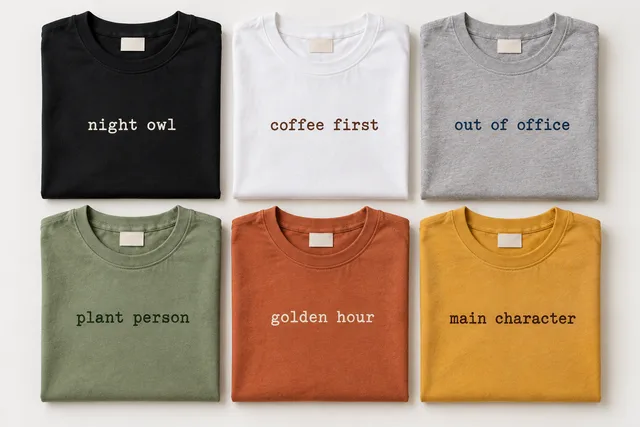
Three classic shirt colors cover most orders: black, white and heather gray. Garment-dyed colors such as sage green, terracotta and mustard give the soft vintage look that minimalist word shirts are known for.
Choose an ink with clear contrast but the same mood: cream on black or terracotta, dark brown on white or mustard, navy on heather gray, and dark forest green on sage.
| Shirt | Ink that works |
|---|---|
| Black | Cream or mustard |
| White | Near-black, brown or rust |
| Heather gray | Navy or near-black |
| Sage green | Dark forest green or cream |
| Terracotta | Cream |
| Mustard | Dark brown or near-black |
4500 x 5100 or 4500 x 5400?
Both are 15 inches wide at 300 DPI. 4500 x 5100 (15 x 17 inches) and 4500 x 5400 (15 x 18 inches) are the two front print files sellers use most. Pick the one your print provider's product page lists, and the text stays at the same place on the chest because the position is set from the top.
If you only need the words, for a mug, a sticker or your own layout in Canva, choose Trim to the text and the PNG is cut close around the letters.
Frequently asked questions
What font do minimalist word shirts use?
Most use a typewriter font like the Typewriter (Special Elite) and Courier options here, in lowercase, one short line across the chest.
Can I put the text on two lines?
Yes. Press Enter in the text box. Each line is centered under the one above it.
How do I move the text higher or lower?
Use the Top, Chest and Center buttons or drag the position slider. The preview shows the whole canvas so you can see where the text will sit.
Is the background transparent?
Yes. Only the letters are drawn and the PNG is saved at 300 DPI, so it prints on any shirt color.
Can I sell shirts made with these fonts?
Special Elite and Courier Prime are free Google Fonts under the SIL Open Font License, which allows commercial use of designs made with them. Check that your phrase is not someone's trademark before you sell it.